TL;DR: Stop using your Goal Zero Yeti 3000X immediately and install the free firmware update version 1.9.5 through the Goal Zero app — that software update is the official recall remedy, and no return is required.
Goal Zero, in cooperation with the U.S. Consumer Product Safety Commission (CPSC), is voluntarily recalling the Yeti 3000X Portable Power Station because its circuit board can overheat, according to the Goal Zero Yeti 3000X Voluntary Recall - Firmware Update notice. The notice describes the hazard as a risk of serious burn injury and fire, and directs owners to stop using the units and install the YETI 3000X firmware update in the app or contact Goal Zero for help installing the free repair. The same notice states that the firmware update is the recall remedy and does not require returning the product to the original place of purchase, whether online or at a retail location.
Recall at a glance
The U.S. recall date was August 20, 2026, with recall number 26-712, according to Goal Zero Recalls YETI 3000X Power Stations Due to Serious Risk of Injury from Fire and Burn Hazards. That CPSC listing identifies the importer as Goal Zero of Draper, Utah, and states the product was manufactured in China. The CPSC listing covers about 46,200 units in the United States.
In Canada, a separate listing titled Goal Zero YETI 3000X Power Stations recalled due to fire and burn hazards identifies 509 units sold in Canada from May 2020 to August 2025, with a recall date of September 11, 2026 and identification number RA-82608. That Canadian listing identifies the distributor as Goal Zero of Midvale, Utah, and the manufacturer as ProVista Technology International Ltd. of Kowloon, Hong Kong. Health Canada assigned the issue as a circuit board that may overheat, posing a risk of fire and burn hazards.
U.S. sales ran from May 2020 through August 2025 for about $3,000, according to the CPSC listing. The CPSC listing states the units were sold at REI stores nationwide and online at Costco.com, Backcountry.com, Goalzero.com and other online retailers. The Goal Zero recall notice similarly states the Yeti 3000X was sold at Costco.com, REI, Backcountry.com and other stores nationwide, and online at goalzero.com from May 2020 through August 2025.
Why the firmware update matters
The Goal Zero recall notice states the power stations may overheat. The CPSC listing phrases the hazard as the recalled power station's circuit board can overheat. Both the company notice and the CPSC listing use repair as the remedy category, specifically a free repair in the form of a firmware update.
Goal Zero has received four reports of Yeti 3000X power stations overheating and smoking, with no injuries reported, according to the company recall notice. The CPSC listing describes those four reports as power stations catching fire, overheating and smoking, and likewise reports no injuries. As of August 31, 2026, the company had received no reports of incidents or injury in Canada, according to the Canadian recall listing.
For households that keep a large power station for outages, the instruction is direct. Consumers should stop using the power stations immediately and install the free repair in the form of a firmware update available through the Goal Zero application or contact Goal Zero for firmware installation at no cost, according to the CPSC listing. The Canadian listing gives the same instruction to immediately stop using the recalled product and install the free YETI 3000X firmware update through the Goal Zero application or contact Goal Zero for installation at no cost.
Which units are included
The recall covers all 120V Yeti 3000X Portable Power Stations, according to the Goal Zero recall notice. That notice lists SKU 36400 and UPC 847974007563. Owners can refer to the nameplate example shown on the company page to verify the model.
Physical identification points are printed in three places, according to the company notice. The name YETI 3000X appears on the front bar of the cart. The name YETI 3000X appears on the bottom front of the power station. The product name and serial number appear on the nameplate located on the underside of the power station's lid.
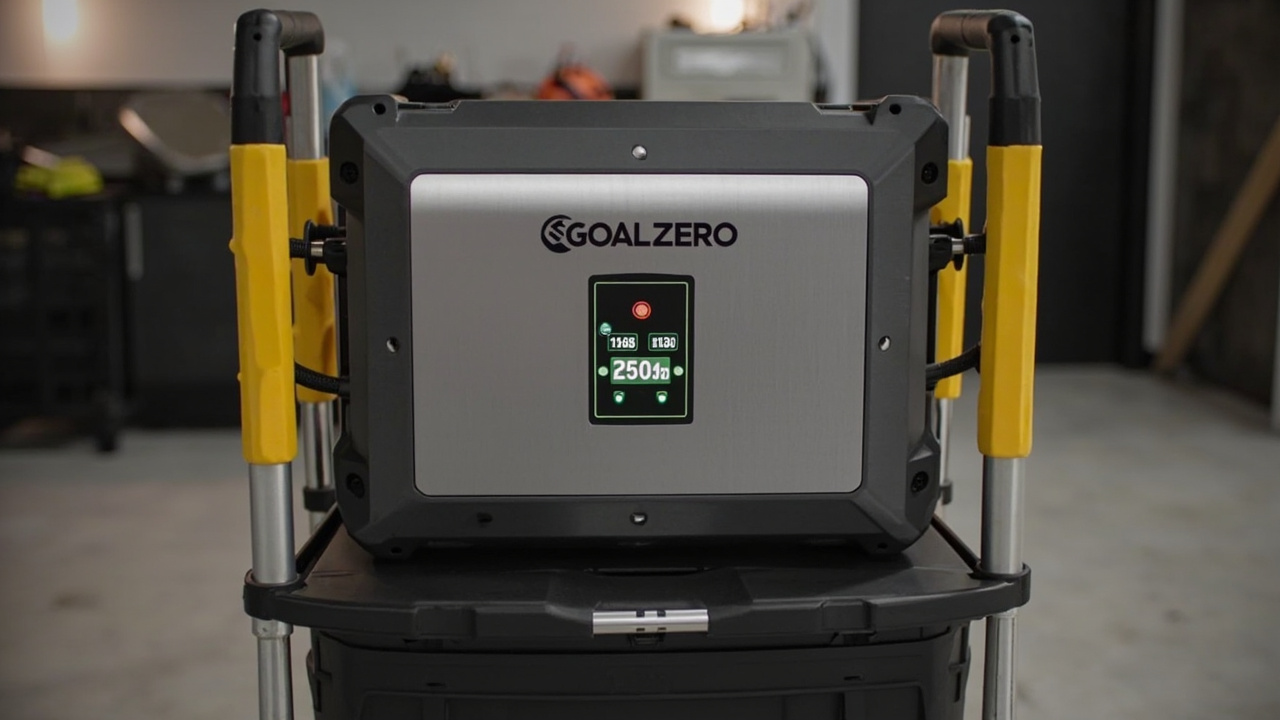
The CPSC description adds detail for visual confirmation. The silver and black portable power stations measure about 24.4 inches high, 18.5 inches wide and 22.3 inches deep, and weigh about 92 pounds. The power stations have yellow handles and a digital display at the front with electrical ports. They sit on a rolling cart with two built-in wheels and a telescoping handle. The Goal Zero logo is printed on the front bar of the cart and on a nameplate located on the underside of the station's lid along with YETI 3000X.
The Canadian listing repeats those dimensions in metric and imperial terms. It describes the units as about 62 centimetres high, 47 centimetres wide and 57 centimetres deep, weighing approximately 42 kilograms. It likewise describes silver and black stations with yellow handles, a digital display at the front with electrical ports, and a rolling cart with built-in wheels and a telescoping handle.
How to verify your model before updating
Step 1 in the company notice is to verify the model of the Goal Zero power station. Check the front bar of the cart for YETI 3000X. Check the bottom front of the power station for YETI 3000X. Check the nameplate on the underside of the lid for the product name and serial number.
The company FAQ section states the update applies to all 120V Yeti 3000X power stations. To confirm the model, that FAQ directs owners to the name printed on the underside of the lid or the product label. The CPSC listing similarly states that Goal Zero and YETI 3000X are printed on the underside of the recalled power stations.
If the markings match, proceed to the app update. If markings are unclear, the company notice directs owners to use the customer support form for direct contact and troubleshooting steps. The CPSC contact section also lists phone and email options for Goal Zero, detailed in the contact section below.
How to install the recall firmware update
Step 2 in the company notice is to install a firmware update through the Goal Zero app. If the app is not already installed, download it for free from the Apple or Google Play store. Existing app users with notifications turned on will receive a push alert that a firmware update is available.
Open the Goal Zero app and ensure connection to Wi-Fi. Install the firmware update by tapping the banner in the app or by going to Settings then Firmware Update. The company recommends a Wi-Fi connection to update the unit, and its FAQ notes hotspot use in the context of connecting the Yeti for the update.
A firmware progress bar will be shown in the app to indicate that the firmware installation process has begun. Confirmation is also visible on the station itself. The display on the Yeti 3000X will show upd while the installation is in progress.
Once the update is complete, the app will show that update progress is complete and will indicate the updated version in the settings page as version 1.9.5. The display of the Yeti 3000X will also indicate the current version of the firmware as 195. Those two numbers refer to the same corrected release, shown in app format and on-device format.
The company's separate Yeti X Firmware Updates Guide describes two connection paths. Updating via Cloud Connect requires Cloud Connect connection, then navigation to Yeti Settings, tapping the firmware version, and tapping install for the latest available firmware. Updating via Direct Connect requires pairing via Direct Connect, navigation to Yeti Settings, tapping the firmware version, tapping install, and providing the SSID and password for a nearby Wi-Fi network for the update. In Direct Connect mode, the Yeti connects to the provided Wi-Fi network for the update.
During installation, the app returns to the Yeti Settings screen, and within a few moments the Yeti begins to beep and blink the Wi-Fi icon as it prepares to update, according to that guide. For firmware v1.5.0 and later, the Yeti enters the updating screen as soon as the update officially begins. After a few minutes, the Yeti shuts down to install the main controller firmware, the screen goes blank for 20 to 30 seconds, then the unit enters the updating screen for the remainder of the install.
If pairing or installation fails
The recall notice includes a pairing help path for owners having issue pairing the Yeti to the Goal Zero app. It points to a step-by-step pairing guide and a Still having trouble section for additional steps. Owners who attempted the firmware update by following the listed steps without success are directed to fill out the customer support form, after which the company states it will contact the owner directly with troubleshooting steps.
Before submitting the support form, the support submission page asks owners to attempt the update using the instructions provided at the company's firmware update link. If the update still cannot be completed, the form asks for error messages or troubleshooting steps already tried in the description field. It also asks owners to attach relevant photos or videos to assist support.
A California Department of Developmental Services memo dated September 11, 2026 notes that nearly 600 people who receive regional center services were provided with the power station through the Disability Disaster Access and Resources Program since 2021, in consultation with the department. That memo directs recipients to follow the video and Goal Zero webpage steps to update firmware through the Goal Zero app, including verifying the model and installing the app update. It states recipients can contact a regional center service coordinator for support on those steps and can also contact the manufacturer directly using the customer support form.
Where to get help and what not to do
Do not return the unit to the store as a first step, because the company notice states the remedy does not require returning the product to the original place of purchase. Do not continue using the station pending the fix, because both U.S. notices instruct consumers to stop using the power stations immediately. Do not redistribute, sell or give away a recalled product in Canada, because the Canadian listing states the Canada Consumer Product Safety Act prohibits those actions.
For direct help, the CPSC listing gives Goal Zero toll-free at 888-794-6250 from 9 a.m. to 2 p.m. MT Monday through Friday, email at [email protected], and online support request options. It also states owners can visit Goalzero.com and click on IMPORTANT RECALL INFORMATION and Firmware Update at the top of the page. The Canadian listing gives telephone 1-888-794-6250 from 9 a.m. to 2 p.m. MST Monday to Friday, email [email protected], or the company website.
Health Canada reminds consumers to report any health or safety incidents related to the use of this product or any other consumer product by filling out the Consumer Product Incident Report Form, according to that Canadian listing. The CPSC also provides a recall complaint form for owners experiencing issues with a recall remedy or believing a company is non-responsive, according to the CPSC recall page.